OpenMP in Visual Studio
These instructions are copied from an email from Steve on 3/12/2024.
Steve's Email
1 Right on a project a select the properties line at the bottom of the popup page of high light the project and type A lt + Enter
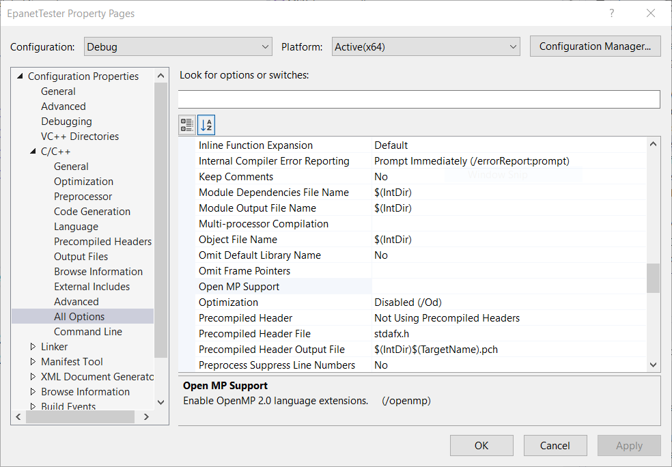
On the properties Panel click on the c/c++ line to expand the list and select the all option line scroll down to the openmp line and select it.
Click the down arrow at the right end of the line to open the option list and select ves or no. If no is selected all line in source files labeled pragma omp will be ignored. Then click the OK button to save your selection
You can verify your selection by clicking the command line selection below the All options selection
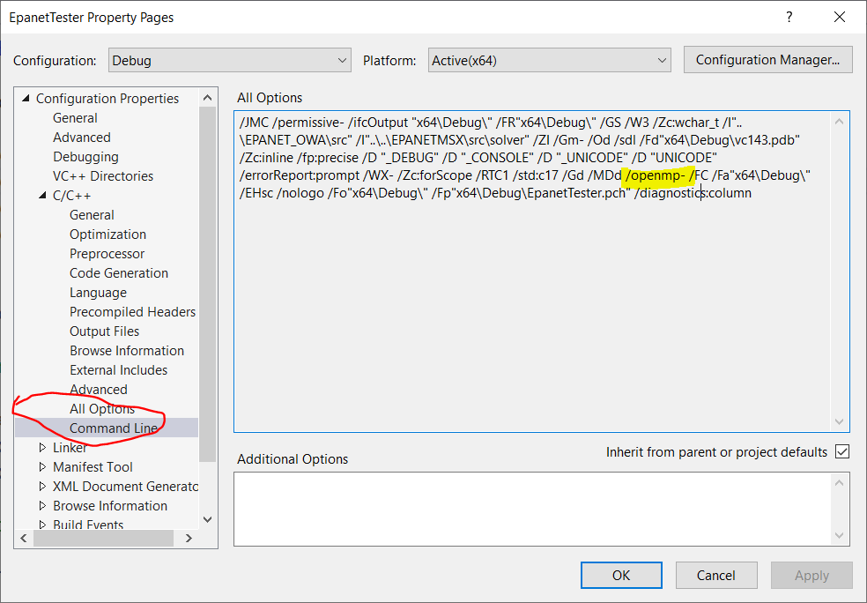
/openmp- no openmp
/openmp+ openmp v2.0 enable
If you want to try one of the newer implementation you need to edit the command line text.